How to Share SoundCloud Music: Methods, Rights and Reach
You've finished a track, copied its SoundCloud link, and opened a message to a DJ. Then you hesitate. Should they hear the private version first? Should you publish it before pitching blogs? And what happens if the remix you included hasn't been cleared?
To share SoundCloud music effectively, choose who should hear it before choosing where to post it. A feedback session, a press preview, and a public release need different access settings, messages, and measures of success.
Table of Contents
- Choose the Right SoundCloud Sharing Method
- Check Rights Before You Share Anything
- Share the Track Step by Step and Roll It Out
- Channels and Messages That Get Listens
- Measure Plays and Adjust Your Next Message
Choose the Right SoundCloud Sharing Method
Use a private link for testing and a public post for release. SoundCloud offers seven sharing methods, but they don't all create discovery: some distribute a track to an audience, while others give someone a way to access it.
SoundCloud's sharing documentation distinguishes public sharing, secret links, reposts, messages, embeds, QR codes, and scheduling: public tracks enter followers' feeds, private tracks aren't searchable, and scheduled releases are available for individual tracks on Artist Pro.
SoundCloud sharing methods by audience and visibility
| Method | Who hears it | Searchable | Best use |
|---|---|---|---|
| Public post | Followers and anyone who finds the track | Yes | Release day and open promotion |
| Private track with secret link | Only people who hold the link | No | Demos, feedback groups and pre-release tests |
| Repost | Followers in their feed, and the top of the reposter's profile | Via the original track | Amplifying a track already posted |
| Direct message | The recipient only | Not applicable | DJs, press and curators |
| Embed | Visitors to the page where the player sits | Not applicable | Blogs, press pages and newsletters |
| QR code | Public track yes; private track no | Print, merch and live events | |
| Scheduled release | Followers from the set release time | Yes, after release time | Timed launches for single tracks on Artist Pro |
Match access to the campaign stage
For an unfinished mix, send a private secret link to a small feedback group. That keeps the listening session focused, but it isn't a confidentiality agreement: someone who holds the link can pass it on.
For a premiere, separate the preview audience from the eventual release audience. Give the editor private access while agreeing on publication timing, then prepare the public track for listeners arriving from the feature.
Use a repost to amplify an existing upload, not as a substitute for publishing the original. Send direct messages when DJs, journalists, or curators need personal context rather than another public announcement.
Practical rule: Choose the audience and campaign stage before clicking Share, not after the link is already circulating.
An embed makes sense when the surrounding page explains the music. A QR code makes sense when the listener is holding a flyer or standing at your merch table. Neither creates an audience by itself.
Publishing unfinished work has a lasting cost: you can change its availability later, but you can't retract what listeners already heard, saved, or shared.
Check Rights Before You Share Anything
Buying a track doesn't give you permission to publish it. Unreleased status doesn't make a recording free to use either.
SoundCloud's repost guidance explains that third-party material, including DJ sets, remixes, and mashups, generally requires permission; purchasing or downloading music doesn't grant publishing rights, and unauthorized sharing of protected unreleased material can lead to removal or account termination.
Start with every sound in the upload, not just the part you produced. Check the vocal sample, backing track, remix source, guest performance, and any recording supplied by a collaborator. A collaborator sending you a file isn't necessarily confirmation that they cleared everything inside it.
Keep a rights note beside the audio
Save the permission record alongside the final master so you don't have to reconstruct the agreement during release week.
- Material covered: Identify the recording, composition, sample, or contribution and the person granting permission.
- Territory: Record where the permission applies, especially if your release campaign reaches listeners internationally.
- Duration: Note when permission starts, when it ends, and whether an expiry requires you to remove the upload.
- Derivative use: Confirm whether remixing, editing, sampling, or excerpting is included.
- Attribution: Copy the required credit wording and record where it must appear.
For promotional excerpts, FindClout on content usage rights is a useful companion when organizing what you're allowed to reuse. Keep the actual permission from the rights holder as your working record, rather than relying on a general explanation.
Fix the problem before publication
Say your DJ set includes an unlicensed remix. Get written permission covering that use, or remove the section before uploading the set publicly. Don't assume permission from the remix producer also clears the underlying song.
A private preview of your own unreleased demo is an audience-control decision. A private preview containing someone else's protected recording still needs a rights check. Privacy isn't a copyright exemption.
When sharing another artist's authorized upload, use the native sharing or repost controls rather than downloading it and creating your own copy. Repeated reposting isn't a dependable reach tactic either, because a later repost can displace an earlier feed appearance.
Before every share, ask:
- Ownership: Do I own every sound?
- Permission: Do I have written permission for anything I didn't make?
- Publication: Am I sharing publicly what I only meant to share privately?
Share the Track Step by Step and Roll It Out
Treat the link as a release asset, not something you copy in a rush. Prepare the destination, test access, and write the message before announcing that the track is available.
This process keeps the technical setup separate from promotion.
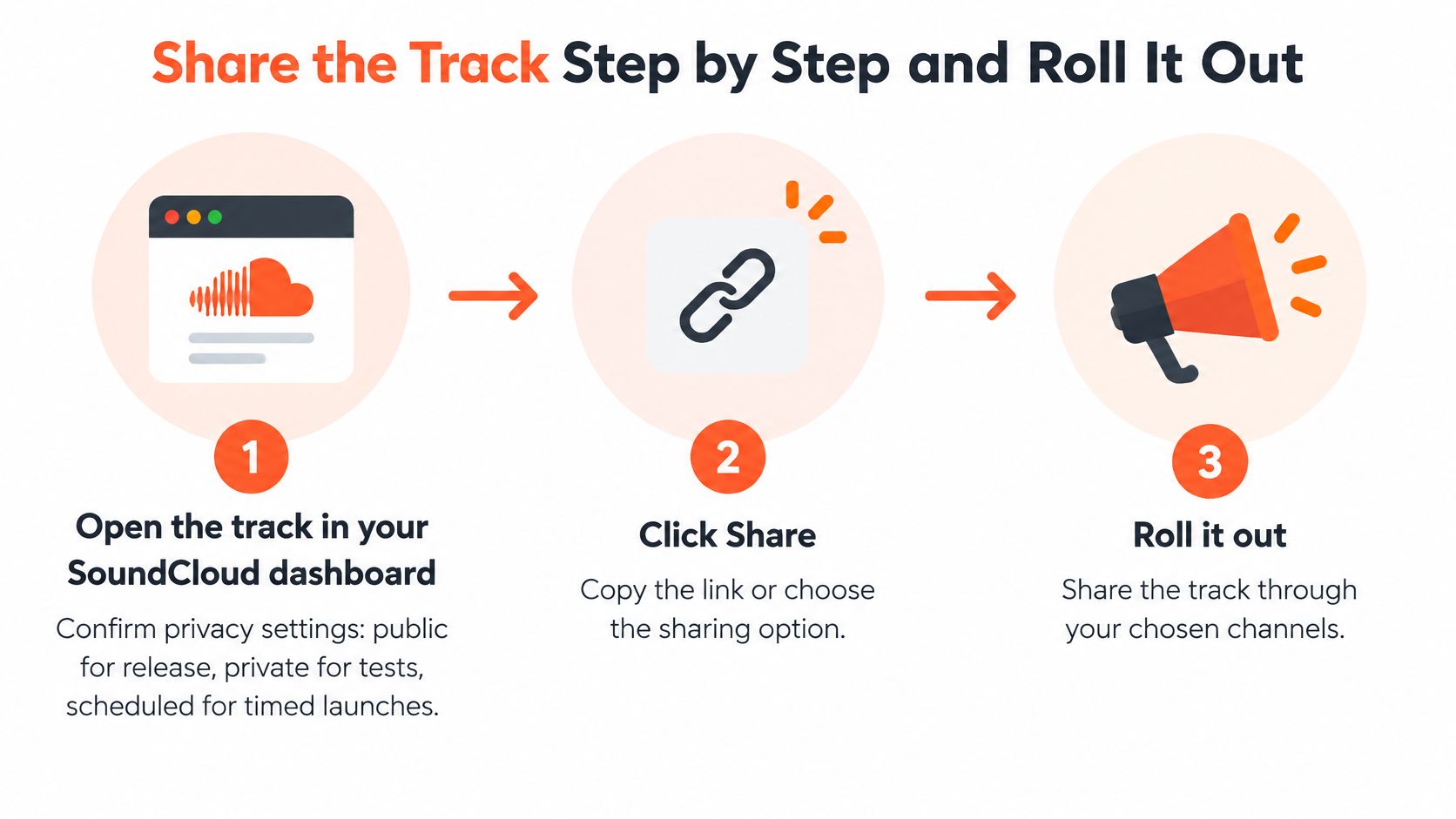
Prepare and test the destination
Open the track in your SoundCloud dashboard. Confirm the intended privacy setting: public for release, private for tests, or scheduled for a timed launch where your account supports it. Check that you're working on the final upload rather than an older demo with similar artwork.
Click Share. Copy the track link or choose the relevant sharing option. For an embed, use the player code supplied by SoundCloud rather than pasting a normal track URL into a page element that expects embed code.
Test as a listener. Open the copied link in a logged-out browser window. Press play, inspect the track title and artwork, and check the mobile experience too. Access that works while you're signed in doesn't prove the recipient can listen.
Write the accompanying message. Lead with the track name and a reason this audience should care, then provide the link. Ask for a specific action, such as feedback on the vocal balance, consideration for a set, or a listen to the finished release.
Start with a suitable channel. Send or publish there first, then read the responses before expanding. Fix a broken destination or confusing description before repeating it elsewhere.
Give each later share a reason to exist
For a hypothetical 10-to-14-day rollout, publish to your own audience on release day, approach a couple of relevant genre communities around day three, and reserve the second week for specialized blog, DJ, and curator outreach. These are working campaign choices, not platform requirements or guaranteed performance windows.
Use the music release strategy guide to organize the broader sequence around your release assets and outreach. If you've promised a premiere, move the press approach earlier so the editor has time to decide before publication.
A later share should add context, not just announce that the same link still exists.
If creator partnerships are part of the campaign, Sup's TikTok influencer agency is a relevant resource to explore while defining creator fit and campaign scope. Prepare a clear excerpt, usage permissions, and listening destination before approaching potential partners.
Channels and Messages That Get Listens
Choose outside channels by listener intent. Someone watching a performance clip needs an immediate musical reason to continue; a journalist needs a story, and a DJ needs to understand where the track fits.
Keep the track name, artwork, and destination consistent across your working devices and campaign assets.
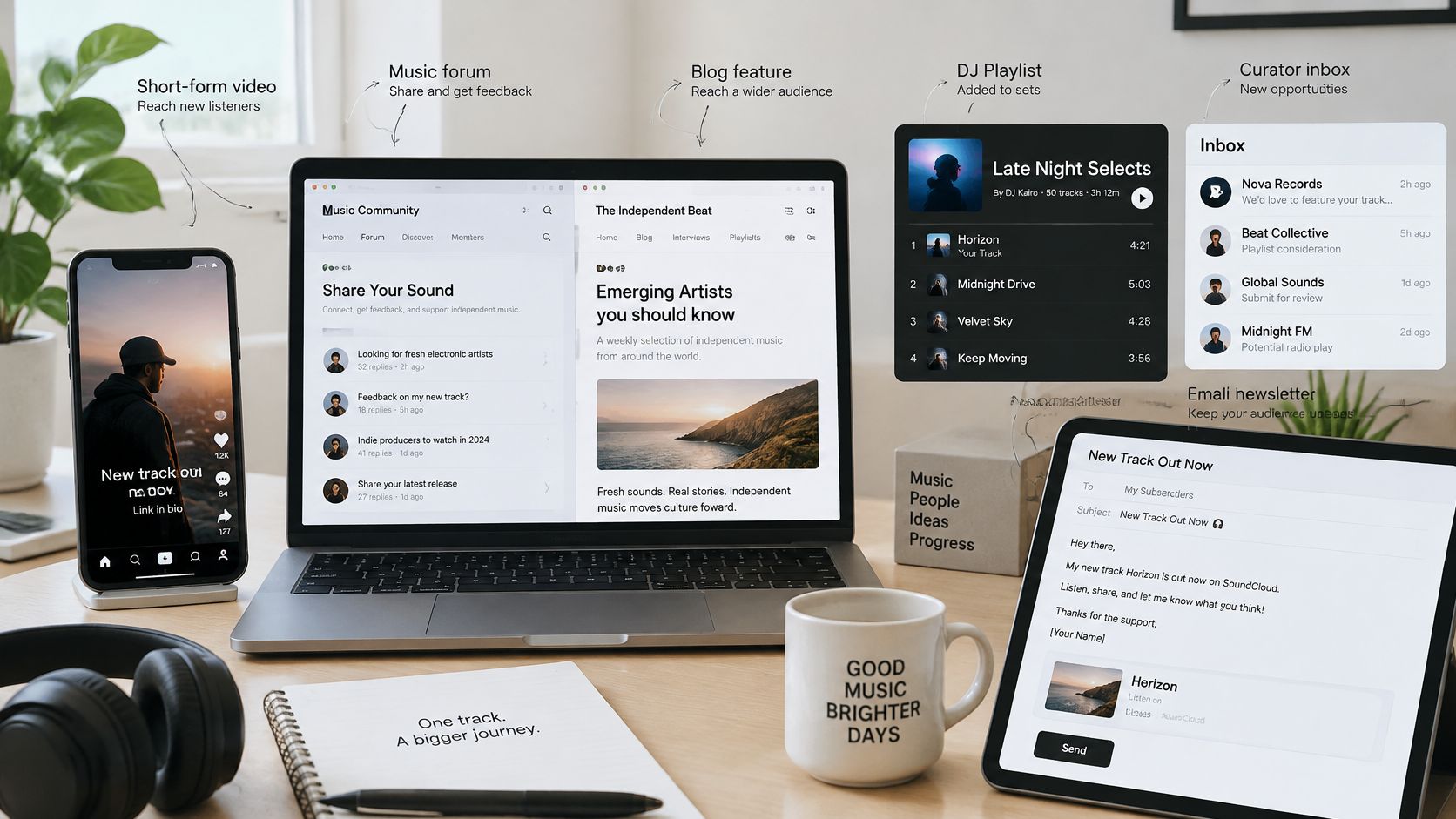
Outside channels and what to send through each
| Channel | Best for | What to include | Avoid |
|---|---|---|---|
| Short-form video clips | Discovery from new listeners | Hook clip with the track name and a link to the full track | Full-length uploads with no hook |
| Music communities and forums | Feedback and niche fans | Context, the specific feedback you want and the link | Posting the same message across dozens of groups |
| Blogs and press | Editorial credibility | Embedded player, a two-line story and the release date | Pitching without a reason the writer's readers would care |
| DJs and curators | Playlist adds and set spins | One line on why the track fits their set, plus the link | Mass copy-paste messages |
| Email newsletter | Existing fans | Direct link, release date and one clear ask | Burying the link below the fold |
Write for the person receiving it
Use these as adaptable drafts, not identical messages to send everywhere. Replace the bracketed fields with actual details, including something specific about the recipient's work.
DJ message
Hi [name], the switch from broken percussion into the stripped-back bass track near the close of your [set name] caught my attention.
My track [title] sits in that same sparse, late-night lane, with an extended drum opening for mixing.
[Private or public SoundCloud link]
Community post
Hi [name or community host], your [specific mix discussion or production thread] helped me focus this question.
I'm finishing [title], a percussion-led track with a low vocal. Does the kick mask the bass when the main groove enters?
[SoundCloud link]
Blog pitch
Hi [name], your piece on [artist or release] stood out because [specific observation about their coverage].
[Title] pairs a dry spoken vocal with percussion recorded from everyday objects.
It's part of [project context], built around turning ordinary sounds into club tracks.
Release date: [confirmed date]. Preview: [SoundCloud link]. Embed available for publication.
Only use story details that are true of your release. A small, specific production story is better than an invented dramatic narrative.
A community question gives people something concrete to answer; a bare link leaves them guessing what you want. For broader channel planning, use the online music promotion guide, then concentrate your effort on the audience closest to your sound.
Write a message for each audience. Don't spend an afternoon polishing a general announcement while sending your best-fit curator an impersonal pitch.
Measure Plays and Adjust Your Next Message
Read results by channel, not just by the track's total plays. A press preview can be useful before it produces public traffic, while a busy comment thread may contain little evidence that anyone listened.
For a hypothetical review routine, check plays and comments at 24 and 72 hours after each share. Count message replies and reshares separately, and record what you can observe rather than assigning every new play to the most recent post.
Separate visits from listening
Use distinct channel links where your link-management setup supports them. Remember that a tracked click proves someone opened a destination, not that they played the track; don't report click totals as SoundCloud listens.
Keep a lightweight campaign log:
| Log field | What to record |
|---|---|
| Share date | When the message went live or was sent |
| Channel and audience | The community, recipient, newsletter, or social placement |
| Message version | The hook, excerpt, and requested action |
| Observable result | Clicks, plays, comments, replies, and reshares kept separate |
| Next change | The specific element you'll test next |
For creator-led placements, campaign measurement insights from Clipatra provide a useful reference point for thinking through reporting. Decide what evidence you need before the placement runs, rather than trying to reconstruct it afterward.
Diagnose before changing the music
If a community post gets replies but little listening, inspect the question. People may be discussing production in general rather than responding to your audio. Make the next question about an identifiable moment in the track.
If a DJ doesn't answer, revise the fit and framing for that recipient. Silence alone isn't evidence that the master needs changing.
Change the message when the invitation is unclear. Change the music when independent listeners identify the same musical problem.
If several audiences mention a weak opening, audition the introduction critically. If listeners report access problems, fix the destination instead of editing the arrangement.
Use the guide to getting SoundCloud plays when planning your next listening-focused test. Keep the successful message and audience pairing in your log so the next release doesn't start from guesswork.
For the example campaign, use a modest success test: the link opens for a logged-out listener, initial plays arrive within a day, and someone comments or reshares. Treat that as a working checkpoint, not a promise of reach.
We offer targeted listener discovery and daily curated recommendations based on your sound, scene, and chosen artists. Visit SCHelper to find relevant potential listeners and build a focused audience-development routine around your next SoundCloud release.